
How to Check SIM Owner Details Using MNP 667 in Pakistan
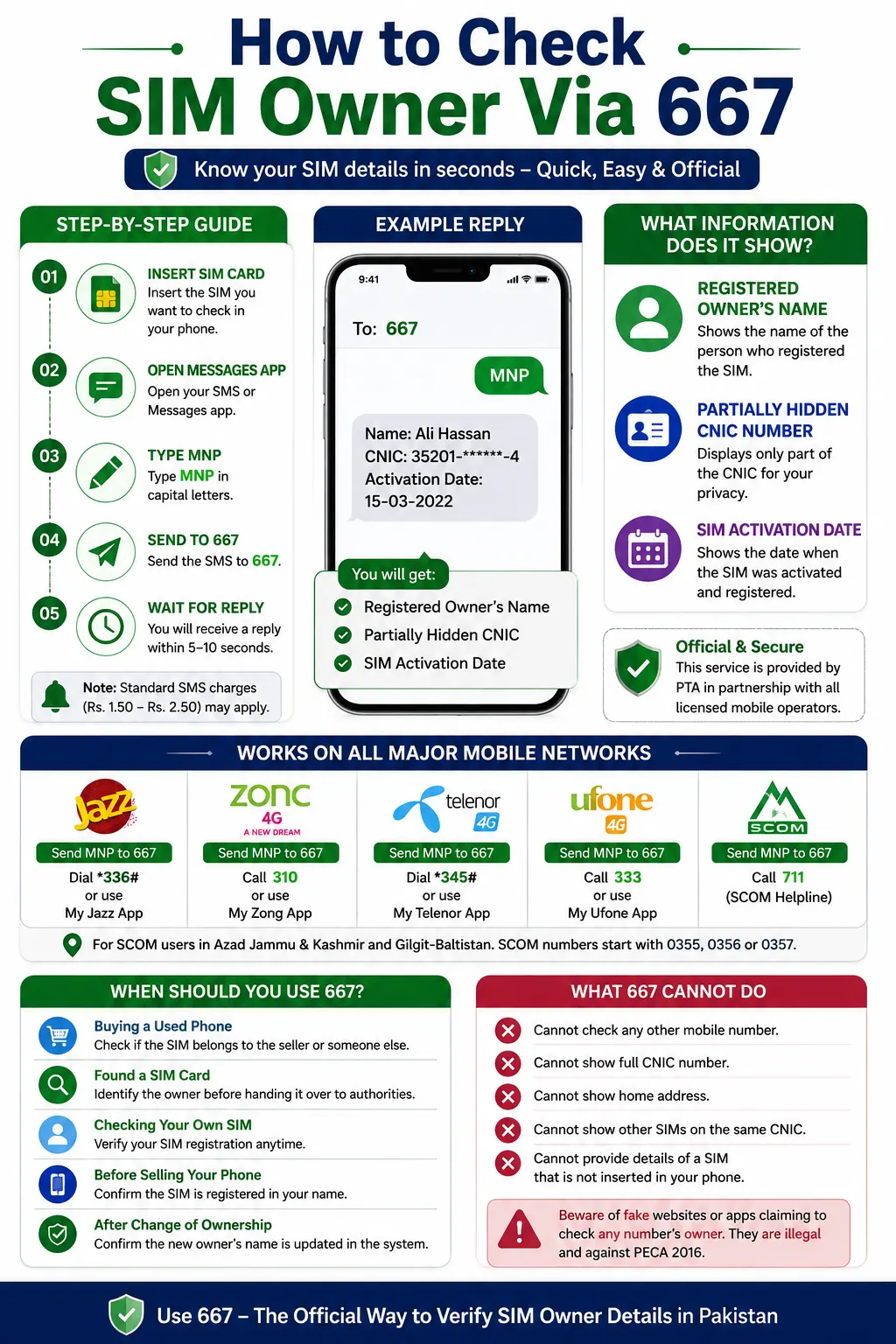
Insert your SIM card into your phone. Send MNP to 667. You will get a reply in a few seconds. The message shows the SIM owner’s name, part of the CNIC number, and the SIM activation date. You can use this service on Jazz, Zong, Telenor, Ufone, and SCOM.
The 667 service only checks the SIM card in your phone. It cannot check the owner of any other mobile number. Many websites and apps claim they can do this. Those claims are false. The 667 service protects your privacy and follows Pakistan’s telecom rules.
The Pakistan Telecommunication Authority (PTA) and mobile network operators run the 667 service. The information comes from the official SIM registration database. This makes 667 a safe, trusted, and legal way to check your SIM details in Pakistan.
Complete Method Check SIM Owner via 667
Follow these simple steps to check your SIM details:
Insert your SIM card.
Make sure the SIM you want to check is inserted into your phone. If you have a dual-SIM phone, use the SIM slot from which you will send the SMS.
Open your Messages app.
Use your phone’s normal SMS or messaging app.
Type MNP.
Write MNP in capital letters. You do not need to enter your CNIC or phone number.
Send it to 667.
Type 667 as the recipient and send the message.
Wait for the reply.
You will usually receive a response within 5–10 seconds.
The reply will show:
- The registered owner’s full name
- A partially hidden CNIC number
- The date the SIM was activated
Note:
A small SMS fee (around Rs. 1.50 to Rs. 2.50) may be charged, depending on your mobile network. Make sure you have enough balance before sending the SMS.
What Information Does the 667 Reply Show?
The 667 reply gives you three important details about your SIM card:
Registered Owner’s Name:
- This shows the name of the person who officially registered the SIM using their CNIC.
- SIM ownership was changed through the proper biometric process; the new owner’s name will be shown.
Partially Hidden CNIC Number:
- Shows only part of the CNIC number.
- Hides the remaining digits to protect your privacy.
- Helps you check if the SIM is in your name.
- Does not show the full CNIC number.
SIM Activation Date:
- Shows the date when the SIM started working on the mobile network.
- May show the latest registration date if the SIM owner changed.
- Helps you check if the SIM is in your name.
- Helps you find out if the SIM belongs to someone else.
- Lets you compare the activation date with your own records.
667 Service on Different Mobile Networks
The 667 SMS service works on all major mobile networks in Pakistan. No matter which network you use, simply send MNP to 667 to check your SIM details.
| Mobile Network | How to Use 667 | Other Self-Service Options |
| Jazz | Send MNP to 667 | Dial *336# or use the My Jazz app |
| Zong | Send MNP to 667 | Call 310 or use the My Zong app |
| Telenor / ONIC | Send MNP to 667 | Dial *345# or use the My Telenor app |
| Ufone | Send MNP to 667 | Call 333 or use the My Ufone app |
| SCO | Send MNP to 667 | Call the SCOM helpline (711) |
The 667 method works the same on every network. After sending the SMS, you will receive the registered owner’s name, a partially hidden CNIC number, and the SIM activation date. You use SCOM in Azad Jammu & Kashmir or Gilgit-Baltistan, you can also use the same 667 service. SCOM numbers usually start with 0355, 0356, or 0357.
Why Should You Use the 667 Code?
You can use the 667 code in many everyday situations.
Buying a Used Phone
Buy a second-hand phone with a SIM card inside, send MNP to 667. You can check the SIM with the seller or another person.
Checking a Found SIM Card
You find a SIM card, use 667 to see the registered owner’s name and a partially hidden CNIC. This information can help you report the SIM to the authorities.
Checking Your Own SIM
Use 667 anytime you want to make sure your SIM is registered in your name. This is helpful after a SIM verification campaign, a long period of not using the SIM, or a network update.
Selling Your Phone
You plan to sell your phone, check the SIM with 667 first. This helps you confirm that the SIM is registered in your name. You recently changed the SIM ownership through biometric verification, send MNP to 667. You can quickly check that the new owner’s name now appears in the system.
What the 667 Code Cannot Do
The 667 SMS service has some limits. It only checks the SIM card in your phone. You cannot use it to check another person’s mobile number. You cannot use it to find the owner of any phone number. It only shows details for the SIM card in your device. Many websites and apps claim they can show the owner of any mobile number through 667. Those claims are false. The official 667 service does not offer this feature.
The 667 Reply Does Not Show
The 667 SMS reply does not include:
- The full CNIC number
- The SIM owner’s home address
- Details of any other SIM cards linked to the same CNIC
FAQ’s
How do I check the SIM owner using 667?
Insert the SIM card into your phone, open the Messages app, type MNP, and send it to 667. You will receive a reply with the registered owner’s name, a partially hidden CNIC number, and the SIM activation date.
What information does the 667 reply show?
The 667 reply shows the registered owner’s name, a partially hidden CNIC number, and the SIM activation date.
Can I check the owner of any mobile number through 667?
No, the 667 service only works for the SIM card is currently inserted in your phone. You cannot check the mobile number of another person.
Does the 667 code work on all mobile networks in Pakistan?
Yes, the 667 service works on Jazz, Zong, Telenor, Onic, Ufone, and SCOM.
Is the 667 SIM owner check service legal?
Yes, 667 service is an official SIM verification method provided via PTA and Pakistan’s licensed mobile network operators.
How long does it take to receive a reply from 667?
You receive the reply within 5 to 10 seconds after sending the SMS.
Is there any charge for sending MNP to 667?
Yes, our mobile network may charge a small SMS fee, between Rs. 1.50 and Rs. 2.50.
What should I do, SIM is not registered in my name?
The reply show another person’s name. Contact your mobile network’s customer service or visit the nearest franchise for help.
Does the 667 reply show the full CNIC number?
No, the reply only shows a partially hidden CNIC number to protect the owner’s privacy.
Can I check all SIMs registered on my CNIC using 667?
No, the 667 service checks only one SIM card at a time. To check all SIMs registered on your CNIC, use the 668 SMS service or official website.
Can I use the 667 code on a dual-SIM phone?
Yes, make sure you send the SMS from the same SIM card you want to verify.
Conclusion
The 667 SMS service gives you a quick and official way to check the SIM card in your phone. Send MNP to 667 to see the owner’s name, part of the CNIC number, and the SIM activation date. You can use this service on all major mobile networks in Pakistan. It helps you to check the SIM is in your name. The service only checks the SIM card in your phone. It cannot check any other mobile number. Use the official 667 service for a safe and legal SIM owner check.