
Telenor USSD Codes List 2026 – All *345# Codes, Balance Check
If you use a Telenor Pakistan SIM, knowing the latest USSD codes can save time and help you manage your account without using the internet. You want to check your remaining balance, activate internet packages, transfer balance, or access account settings. Telenor’s USSD menu makes everything available from your phone’s dial pad. In this guide, we have organized the most useful Telenor USSD codes for 2026 into categories, making it easy to find the code you need.
What is a Telenor USSD Code?
A USSD (Unstructured Supplementary Service Data) code is a short command that lets you communicate directly with the Telenor network.
USSD services work:
- Without internet
- On smartphones and keypad phones
- Instantly
- 24/7
Simply dial the code and press the Call button.
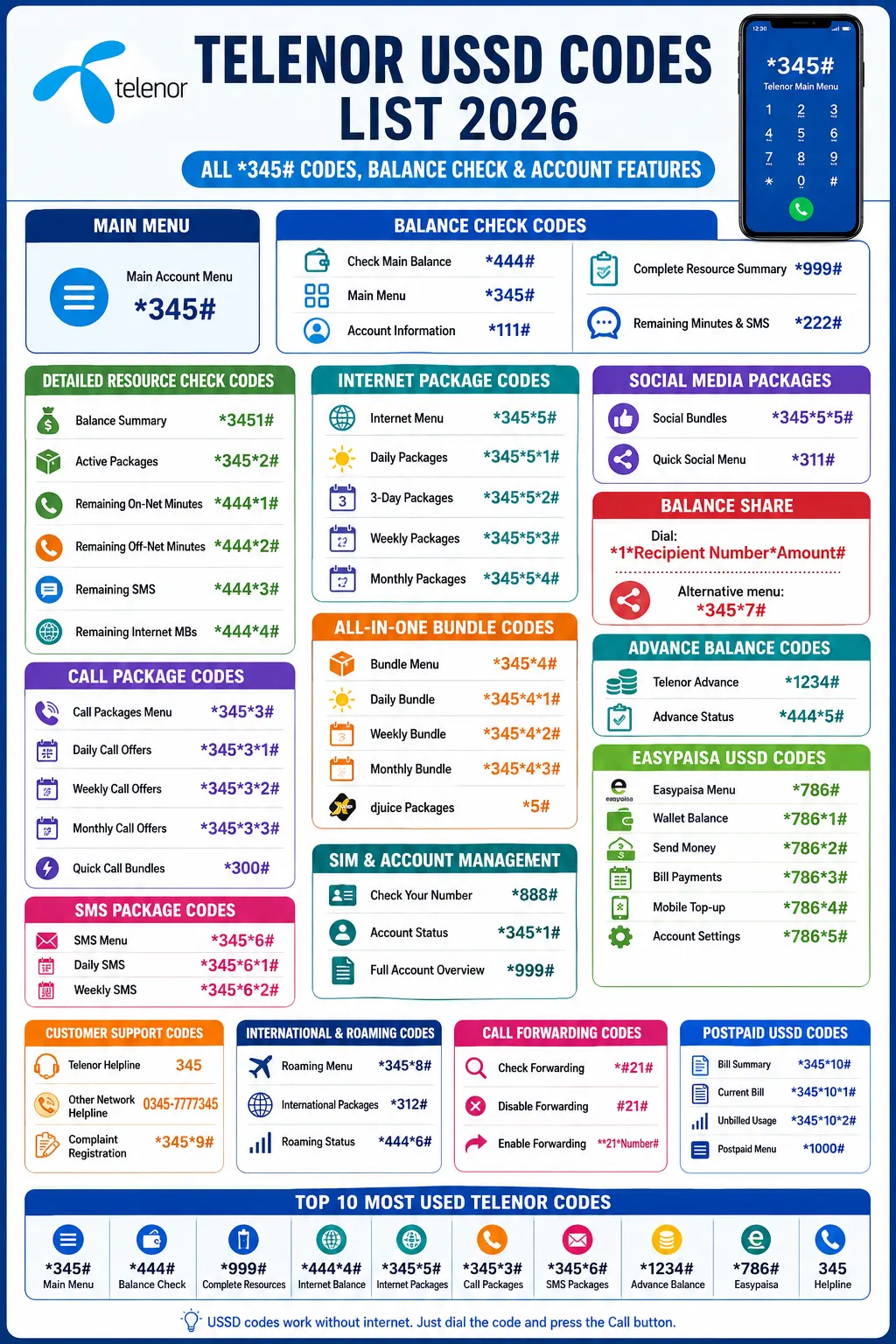
Telenor Main USSD Menu
| Function | USSD Code |
| Main Account Menu | *345# |
The *345# menu is the primary gateway to almost every Telenor self-service feature, including balance information, package subscriptions, and account management.
Telenor Balance Check Codes
| Feature | Code |
| Check Main Balance | *444# |
| Main Menu | *345# |
| Account Information | *111# |
| Complete Resource Summary | *999# |
| Remaining Minutes & SMS | *222# |
Detailed Resource Check Codes
| Resource | USSD Code |
| Balance Summary | *3451# |
| Active Packages | *345*2# |
| Remaining On-Net Minutes | *444*1# |
| Remaining Off-Net Minutes | *444*2# |
| Remaining SMS | *444*3# |
| Remaining Internet MBs | *444*4# |
Telenor Internet Package Codes
Internet Packages Menu
Check Ufone Internet Packages USSD Codes
| Package | Code |
| Internet Menu | *345*5# |
| Daily Packages | *345*5*1# |
| 3-Day Packages | *345*5*2# |
| Weekly Packages | *345*5*3# |
| Monthly Packages | *345*5*4# |
Data Usage Codes
| Feature | Code |
| Remaining Internet | *444*4# |
| 4G Status | *336# |
| Internet Menu | *345*5# |
Social Media Packages
| Package | Code |
| Social Bundles | *345*5*5# |
| Quick Social Menu | *311# |
Telenor Call Packages
| Package | Code |
| Call Packages Menu | *345*3# |
| Daily Call Offers | *345*3*1# |
| Weekly Call Offers | *345*3*2# |
| Monthly Call Offers | *345*3*3# |
| Quick Call Bundles | *300# |
All-in-One Bundle Codes
| Feature | Code |
| Bundle Menu | *345*4# |
| Daily Bundle | *345*4*1# |
| Weekly Bundle | *345*4*2# |
| Monthly Bundle | *345*4*3# |
| djuice Packages | *5# |
SMS Package Codes
| Package | Code |
| SMS Menu | *345*6# |
| Daily SMS | *345*6*1# |
| Weekly SMS | *345*6*2# |
SIM & Account Management Codes
| Feature | Code |
| Check Your Number | *888# |
| Account Status | *345*1# |
| Full Account Overview | *999# |
Telenor Balance Share Code
Need to send balance to another Telenor user?
- Dial: *1*Recipient Number*Amount#
- Alternative menu: *345*7#
Telenor Advance Balance Code
| Feature | Code |
| Telenor Advance | *1234# |
| Advance Status | *444*5# |
Easypaisa USSD Codes
Since Easypaisa is closely integrated with Telenor services, these codes are useful for wallet users.
| Feature | Code |
| Easypaisa Menu | *786# |
| Wallet Balance | *786*1# |
| Send Money | *786*2# |
| Bill Payments | *786*3# |
| Mobile Top-up | *786*4# |
| Account Settings | *786*5# |
Customer Support Codes
| Service | Contact |
| Telenor Helpline | 345 |
| Other Network Helpline | 0345-7777345 |
| Complaint Registration | *345*9# |
International & Roaming Codes
| Feature | Code |
| Roaming Menu | *345*8# |
| International Packages | *312# |
| Roaming Status | *444*6# |
Useful Security Codes
Call Forwarding
| Function | Code |
| Check Forwarding | *#21# |
| Disable Forwarding | #21# |
| Enable Forwarding | **21*Number# |
Here’s a simpler and more reader-friendly version:
Important Safety Tip
Never dial call forwarding codes if someone claiming to be from Telenor asks you to do so over a call or message. Scammers may try to redirect your calls to their own number. To check if call forwarding is active, dial *#21#. If you see an unknown forwarding number, dial #21# to turn it off. If you think your account has been targeted, call 345 for help.
Telenor Postpaid USSD Codes
| Feature | Code |
| Bill Summary | *345*10# |
| Current Bill | *345*10*1# |
| Unbilled Usage | *345*10*2# |
| Postpaid Menu | *1000# |
Top 10 Most Used Telenor Codes
| Purpose | Code |
| Main Menu | *345# |
| Balance Check | *444# |
| Complete Resources | *999# |
| Internet Balance | *444*4# |
| Internet Packages | *345*5# |
| Call Packages | *345*3# |
| SMS Packages | *345*6# |
| Advance Balance | *123*4# |
| Easypaisa | *786# |
| Helpline | 345 |
Protect Your Easypaisa Account
If someone gains access to your Telenor SIM, your Easypaisa account could also be at risk. To keep your money safe, take these steps:
- Call Easypaisa support immediately if you think your SIM has been compromised or lost.
- Change your Easypaisa MPIN after you recover your Telenor SIM.
- Check your transaction history to make sure there are no payments or transfers you didn’t make.
- Monitor your Telenor SIM regularly. If your SIM suddenly stops working without any reason, contact Telenor and Easypaisa as soon as possible to secure your accounts.
FAQs
How can I check my Telenor balance?
Dial *444# from your Telenor SIM and press the Call button. Your remaining balance will appear on your screen.
What is the Telenor main USSD code?
The main Telenor self-service menu is *345#. From this menu, you can check your balance, activate packages, and manage your account.
How can I check my remaining SMS and minutes?
Dial *222# to view your remaining SMS and call minutes included in your active package.
How do I activate Telenor internet packages?
Dial *345*5# to open the internet packages menu. You can choose daily, weekly, or monthly internet bundles.
How can I subscribe to Telenor call packages?
Dial *345*3# to see available call packages and subscribe to the one you want.
How can I check my Telenor number?
Dial *888# to display your Telenor mobile number on your phone screen.
9. How do I transfer balance to another Telenor number?
Dial *1Recipient NumberAmount# and press the Call button to share balance with another Telenor user.
How can I check all my remaining resources?
Dial *999# to view your remaining balance, internet MBs, SMS, and minutes in one place.
What is the Easypaisa USSD code?
Dial *786# to access the Easypaisa menu for sending money, paying bills, and checking your wallet.
How do I contact Telenor customer care?
Call 345 from your Telenor SIM. If you’re calling from another network, dial 0345-7777345.
Do Telenor USSD codes work without the internet?
Yes. Telenor USSD codes work without mobile data or Wi-Fi. You only need network coverage to use them.
Are Telenor USSD codes free to use?
Most Telenor USSD menu codes are free, but some services, such as balance inquiry or package activation, may have a small service charge depending on Telenor’s current policy.
Can I use Telenor USSD codes on a keypad phone?
Yes. All Telenor USSD codes work on both smartphones and keypad (feature) phones.
Why is my Telenor USSD code not working?
A USSD code may not work if you have poor network coverage, entered the code incorrectly, or if Telenor has updated the service. Try again later or contact customer support.
Conclusion
Telenor USSD codes make it easy to manage your SIM without an internet connection. Whether you want to check your balance, view remaining MBs, activate internet, call or SMS packages, transfer balance, or access account services, these codes help you complete tasks quickly from your phone. Keep this updated Telenor USSD Codes List 2026 handy so you can find the right code whenever you need it. If any code does not work, it may have been updated by Telenor, so it’s a good idea to check the latest information through Telenor customer support or the official website.