
Ufone USSD Codes List 2026 – All *786# Codes, Balance Check, and Account Features
Ufone is one of Pakistan’s leading mobile networks and is part of the PTCL Group. It provides mobile services to millions of users across the country and uses number series such as 0333, 0334, 0335, 0336, and 0337. Ufone customers can use USSD codes to manage their accounts without needing an internet connection or the UPTCL app.
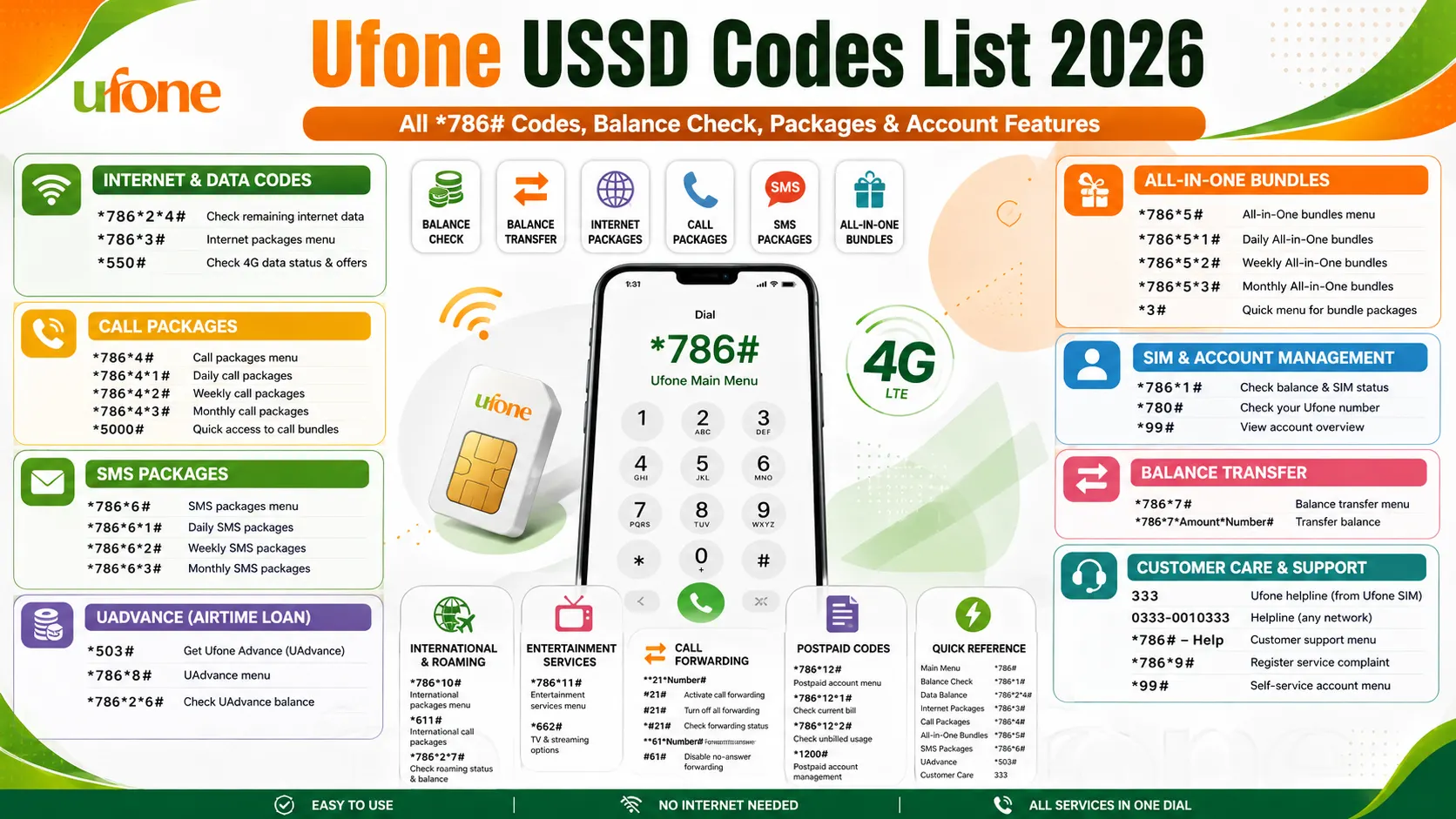
By dialing a USSD code, users can check their balance, subscribe to packages, share balance, activate offers, and access other account services directly from their phones. This guide includes the most useful Ufone USSD codes for 2026, including balance check codes, package menus, account features, and the *786# UCash menu. All codes and services have been verified according to the latest available Ufone information for 2026.
Ufone Internet & Data USSD Codes (2026)
Use these USSD codes to check your remaining internet data or subscribe to Ufone internet packages without using the mobile app.
| USSD Code | Function |
| *786*2*4# | Check remaining internet data (MB/GB) |
| *786*3# | Open the Internet Packages menu |
| *550# | Check 4G data status and available internet offers |
Tip: If you only want to see your remaining internet data, dial *786*2*4#. To browse and activate new daily, weekly, or monthly internet bundles, dial *786*3#.
Ufone Internet Package Subscription Codes (2026)
Use these USSD codes to browse and subscribe to Ufone internet bundles directly from your phone. Zong SIM USSD Codes
| USSD Code | Package Category |
| *786*3# | Internet packages main menu |
| *786*3*1# | Daily internet packages |
| *786*3*2# | Weekly internet packages |
| *786*3*3# | Monthly internet packages |
| *786*3*4# | 3-Day internet packages |
| *543# | Quick access to Ufone internet bundles |
Ufone 4G Package USSD Codes (2026)
Use these USSD codes to check and subscribe to Ufone 4G internet packages.
| USSD Code | Function |
| *550# | View and activate Ufone 4G packages |
| *786*3*5# | Browse 4G data packages |
| *786*3*6# | View 4G social media bundles |
Ufone Social Media Bundle Codes (2026)
Use these USSD codes to browse and activate social media internet bundles for apps like WhatsApp, Facebook, and YouTube.
| USSD Code | Function |
| *786*3*6# | Open the Social Media Bundles menu |
| *500# | Quick access to the Daily Social Package |
Ufone Call Package USSD Codes (2026)
Use these USSD codes to view and subscribe to Ufone call bundles. Jazz USSD Codes
| USSD Code | Function |
| *786*4# | Open the Call Packages menu |
| *786*4*1# | View Daily call packages |
| *786*4*2# | View Weekly call packages |
| *786*4*3# | View Monthly call packages |
| *5000# | Quick access to Ufone call bundles |
Ufone All-in-One Bundle Codes (2026)
Use these USSD codes to subscribe to Ufone All-in-One bundles that include calls, SMS, and internet data in a single package.
| USSD Code | Function |
| *786*5# | Open the All-in-One Bundles menu |
| *786*5*1# | View Daily All-in-One bundles |
| *786*5*2# | View Weekly All-in-One bundles |
| *786*5*3# | View Monthly All-in-One bundles |
| *3# | Quick menu for Ufone bundle packages |
Ufone SMS Package USSD Codes (2026)
Use these USSD codes to view and subscribe to Ufone SMS bundles.
| USSD Code | Function |
| *786*6# | Open the SMS Packages menu |
| *786*6*1# | View Daily SMS packages |
| *786*6*2# | View Weekly SMS packages |
| *786*6*3# | View Monthly SMS packages |
Ufone SIM & Account Management Codes (2026)
Use these USSD codes to check your SIM information, account status, and registered Ufone number
| USSD Code | Function | Purpose |
| *786*1# | Check account balance and SIM status | Confirms your SIM is active |
| *780# | Check your Ufone mobile number | Displays your registered Ufone number |
| *99# | View account overview | Shows basic account and SIM status |
Ufone Balance Transfer Codes (2026)
| USSD Code | Function |
| *786*7# | Open the Balance Transfer menu |
| *786*7*Amount*Recipient Number# | Transfer balance to another Ufone number |
Ufone Advance Balance (UAdvance) Codes
| USSD Code | Function |
| *503# | Get Ufone Advance (UAdvance) |
| *786*8# | Open the UAdvance menu |
| *786*2*6# | Check your UAdvance balance |
Ufone Customer Care & Support Codes
| Code / Number | Function |
| 333 | Ufone helpline (from a Ufone SIM) |
| 0333-0010333 | Helpline from any network |
| *786# – Help | Customer support menu |
| *786*9# | Register a service complaint |
| *99# | Self-service account menu |
Ufone International & Roaming Codes
| USSD Code | Function |
| *786*10# | International packages menu |
| *611# | International call packages |
| *786*2*7# | Check roaming status and balance |
Ufone Entertainment Services
| USSD Code | Function |
| *786*11# | Entertainment services menu |
| *662# | TV and streaming options |
Ufone Call Forwarding Codes
| USSD Code | Function |
| **21*Number# | Activate call forwarding |
| #21# | Turn off all call forwarding |
| *#21# | Check call forwarding status |
| **61*Number# | Forward calls when unanswered |
| #61# | Disable no-answer forwarding |
Ufone Postpaid USSD Codes
| USSD Code | Function |
| *786*12# | Postpaid account menu |
| *786*12*1# | Check current bill |
| *786*12*2# | Check unbilled usage |
| *1200# | Postpaid account management |
Ufone USSD Quick Reference (2026)
| Function | USSD Code |
|---|---|
| Main Menu | *786# |
| Quick Account Overview | *99# |
| Balance Check | *786*1# |
| Check All Remaining Resources | *786*2# |
| Data Balance | *786*2*4# |
| Check Your Number | *780# |
| Internet Packages | *786*3# |
| Call Packages | *786*4# |
| All-in-One Bundles | *786*5# |
| SMS Packages | *786*6# |
| Balance Transfer | *786*7# |
| UAdvance | *503# |
| Call Forwarding Status | *#21# |
| Disable Call Forwarding | #21# |
| Register Complaint | *786*9# |
| Customer Care | 333 |
| Helpline (Any Network) | 0333-0010333 |
Ufone USSD Code Troubleshooting
If a Ufone USSD code is not working, try the following simple solutions.
USSD Code Not Working
- Make sure you enter the code correctly with * at the beginning and # at the end.
- Some USSD codes work only for prepaid or postpaid users, so check your SIM type.
- If you are using an ONIC SIM, some Ufone USSD codes may not be available. Use the ONIC app to manage your account.
The package is not activating
- Check that you have enough balance before subscribing to a package.
- Follow all on-screen instructions if the package requires confirmation.
- If the package still does not activate, contact Ufone Customer Care (333) for assistance.
All USSD Codes Have Stopped Working
- Restart your phone and try the code again.
- If none of the USSD codes work, your SIM may be temporarily suspended or there may be a network issue.
- Call 333 from your Ufone SIM or 0333-0010333 from any other network to check your SIM status and get support.
FAQs
What is the main Ufone USSD code?
The main Ufone USSD code is *786#. It opens the main menu where you can access internet packages, call bundles, SMS offers, UAdvance, balance transfer, and other account services.
How do I activate Ufone internet packages?
Dial *786*3# to open the internet packages menu and choose a daily, weekly, monthly, or 3-day bundle.
How do I transfer balance on Ufone?
Dial *786*7# or use *786*7*Amount*Recipient Number# to transfer balance to another Ufone prepaid user.
How do I activate Ufone All-in-One bundles?
Dial *786*5# to view and subscribe to All-in-One bundles that include calls, SMS, and internet data.
Why is my Ufone USSD code not working?
Make sure you entered the code correctly, check whether you are using a prepaid or postpaid SIM, and confirm that your SIM has network coverage. If the problem continues, contact 333.
Why is my Ufone package not activating?
Your package may not activate because you have insufficient balance or the activation process was not completed. Check your balance and try again, or contact customer care if the issue continues.
What should I do if all Ufone USSD codes stop working?
Restart your phone first. If the problem remains, your SIM may be temporarily blocked or there may be a network issue. Call 333 or 0333-0010333 for assistance.
Can ONIC users use Ufone USSD codes?
Some basic Ufone USSD codes may work on ONIC SIMs, but most account management and package activation are available through the ONIC app.
Is the *786# menu free to use?
Yes, the *786# menu is generally available for accessing Ufone services. However, some balance inquiry or package activation requests may have standard service charges depending on Ufone’s current policy.
Conclusion
Ufone USSD codes make it easy to manage your mobile account without an internet connection. Whether you want to check your balance, view your remaining data, activate internet, call or SMS packages, transfer balance, use UAdvance, or contact customer support, these codes provide quick access to the services you need. This Ufone USSD Codes List 2026 includes the most useful and up-to-date codes to help you manage your Ufone SIM more easily. Since telecom services may change over time, it’s a good idea to check Ufone’s official updates for the latest package details and service changes.